

As a cloud architect or IT administrator, when you plan to run an application in Compute Engine, you need to design a compute instance topology that you can provision and operate efficiently.
Compute Engine offers a range of deployment options: for example, you could deploy a group of compute instances that you manage as a single entity, or you could and manage the instances as individual resources. Each approach has distinct merits and limitations. How do you choose an optimal deployment strategy?
- Start by assessing the key requirements of your application.
- Review the available deployment options and their relative merits.
- Select a strategy that meets your requirements and makes optimal use of the capabilities of Compute Engine.
Assess your workload
Use the following questions to analyze the key requirements of the workload that you want to deploy. Your answers will help you map the capabilities of each deployment option (listed in the next section) to the requirements of your workload. For an interactive, AI-powered alternative to this decision flow, you can prompt Gemini in the Google Cloud console with your project goals to get tailored deployment recommendations. For more information, see Design compute infrastructure with Compute Advisor.
Application state
Is the application stateful?
- A stateful application stores certain data, such as the client or session ID, until that data is no longer necessary. For example, in an online shopping app, the shopping cart service might store details of items that are added or removed as the user continues shopping, and persist the final cart state when the user starts the check-out process.
- A stateless application does not need to store any client, transaction, or session data. For example, a web server might close a session after serving the content that the client requested.
To learn more about stateful and stateless applications, see How stateful workloads are different from stateless workloads.
Should any instance-specific metadata be preserved when your compute instances reboot or when Compute Engine recreates (autoheals) the instances?
Provisioning
- Should the compute instances use a mix of machine types or images? For example, do some instances need memory-optimized machine types while others use general-purpose machine types?
- Should the infrastructure scale automatically in tune with changes in load, so that you maintain an optimal balance between cost and response time?
- Can all the compute instances run within a single zone, VPC network, and subnet?
- Should the application run in the same zone as certain other resources? For example, does the application require a low-latency connection with a database?
Operations
- Do you want to manage the compute instances as a single group? For example, would you like to automate rolling out application updates across all instances?
- Do you need to use a custom or third-party tool to manage the compute instances?
- Do you need control over handling failed compute instances? For example, if a VM fails, would you like it to remain stopped while you determine the root cause for the failure?
- Do you need control over the start-stop-suspend-resume sequence or schedule of your compute instances? For example, to save cost, do you plan to stop the instances during weekends or for certain hours of the day?
Resilience
- Does the application need protection against zonal failures? In other words, if a zone is down, would you like the application to continue serving requests from compute instances in other zones in the region?
- If a compute instance stops or crashes for any reason, or if the application doesn't respond to requests, should Compute Engine recreate the instance automatically?
- Does the application need fixed internal or external IP addresses for the host compute instances?
Now that you've assessed your requirements, learn about the deployment options that Compute Engine offers.
Review the available deployment options
Review and understand the features and relative advantages of the options that you can consider for deploying your workloads to Compute Engine.
- Standalone compute instances
- With this option, you choose the machine type, image, disks, and other attributes individually for each compute instance that you provision. You manage the instances as separate resources.
- Clusters of compute instances
- With this option, you create a group of compute instances that are physically
located close to each other to provide low-latency, high-bandwidth network
connectivity for high performance computing (HPC) and artificial intelligence
(AI) workloads.
- For CPU-based workloads, you can create clusters using C2, C2D, H3, and H4D machine types. For more information, see Create HPC clusters on Compute Engine.
- For GPU-based workloads, see AI Hypercomputer.
- Unmanaged instance group
- You can provision standalone compute instances and add them to an instance group. You can then use the unmanaged instance group as a backend to a load balancer.
- Managed instance group (MIG)
A MIG is a group of identical or similarly configured instances that you provision by using an instance template.
You can make a MIG stateful, so that specific disks or metadata are preserved.
For a stateless MIG, you can enable autoscaling and configure a scaling policy.
While creating a MIG, you can choose to deploy the compute instances within a single zone, or distribute them across more than one zone in a region for high availability.
The following table summarizes the key features of each deployment option.
| Capability | Standalone compute instances | Unmanaged instance group | Stateful MIG | Stateless MIG |
|---|---|---|---|---|
| Template-based provisioning of a group of compute instances | ||||
| Mix of machine types and images | ||||
| Fixed internal or external IP addresses | ||||
| Automatic healing of failed compute instances | ||||
| Control over compute instance start-stop and suspend-resume operations | ||||
| Setting a group of compute instances as a load-balancer backend | ||||
| Disk and metadata preservation, for stateful workloads | ||||
| Controlled update of specific compute instances | ||||
| Automatic rolling update of all the compute instances | ||||
| Automatic (and predictive) horizontal scaling |
The following diagrams show sample deployments side-by-side to help you understand the key differences.
| Standalone compute instances | Stateful MIG | Stateless MIG |
|---|---|---|
| This example shows three compute instances created individually. | This example shows a MIG containing three similarly configured compute instances, provisioned by using an instance template. |
This example shows a MIG containing three identical compute instances, provisioned by using an instance template. |

|

|

|
|
|
|
You've now assessed your workload, reviewed the deployment options that Compute Engine offers, and are ready to choose a deployment approach.
Select a deployment strategy
The recommendations discussed here are based on a mapping of specific workload characteristics to the capabilities of each Compute Engine deployment option.
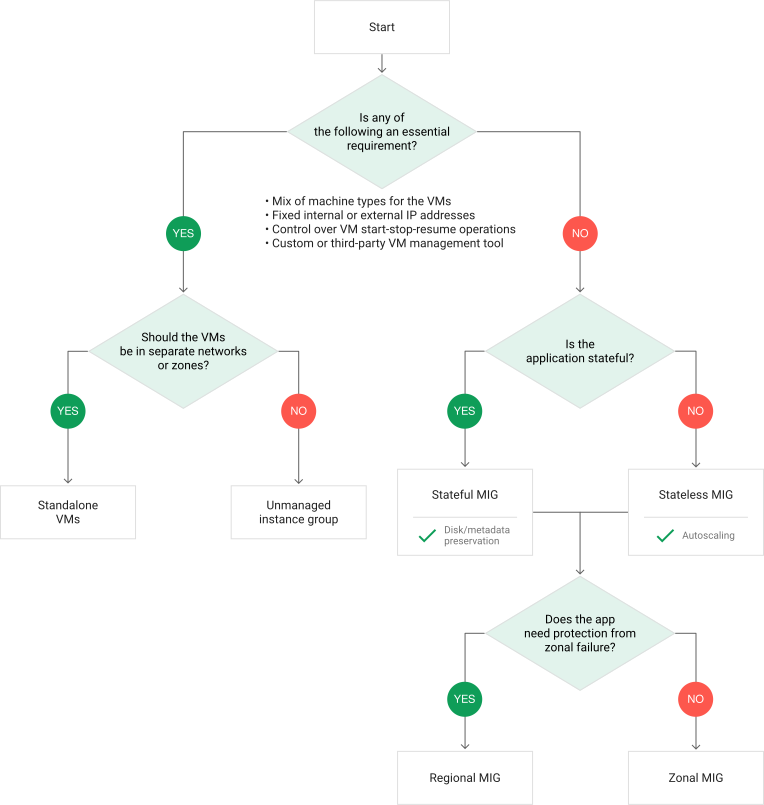
Use the following decision-making flow. If you prefer a visual guide, see the decision tree later in this document.
Choose between standalone compute instances, clusters of compute instances, and instance groups.
Requirements Recommended deployment strategy The application is a high performance computing (HPC) or artificial intelligence (AI) workload that requires low-latency, high-bandwidth network connectivity between compute instances. Choose clusters of compute instances.
Skip the remainder of this decision-making flow.
At least one of the following requirements is essential for your workload. - The application must run on compute instances that use a mix of machine types or images.
- The application needs fixed internal or external IP addresses for the host compute instances.
- You need control over handling failed compute instances.
- You need control over your compute instances' start-stop or suspend-resume operations.
- You need to use a custom script or third-party tool to provision and remove compute instances.
Choose standalone compute instances.
If all the standalone compute instances can run in a single zone, VPC network, and subnet, consider adding the compute instances to an unmanaged instance group. You can then use the unmanaged instance group as a backend to a load balancer.
Skip the remainder of this decision-making flow.
None of these requirements is essential for your use case. Use a MIG to set up a Compute Engine topology that is highly available and scalable.
Proceed to the next step.
Choose between a stateful and stateless MIG.
Requirements Recommended MIG type The application requires disk and metadata preservation; that is, the application is stateful. Choose a stateful MIG, and configure the disks that Compute Engine should preserve during disruptive events like compute instance recreation, autohealing, and updates.
Proceed to the next step.
The application is not stateful. Choose a stateless MIG, and take advantage of the autoscaling capability. During disruptive operations, Compute Engine recreates disks according to the instance template.
Proceed to the next step.
Choose between a zonal and regional MIG.
Requirements Recommended MIG type The application must run in a single zone, or protection against zonal failures is not essential. Choose a zonal MIG. The application must continue to run even when a zonal failure occurs. Choose a regional MIG.
Decision tree
The following diagram guides you through the factors to consider when deciding your Compute Engine deployment strategy:
What's next
- Learn more about instance templates.
- Learn how stateful MIGs work.
- Learn more about regional MIGs.
- Create a MIG.
- Autoscale groups of instances.
- Migrate an existing workload to a stateful MIG.