

You can configure a Document AI custom extractor to modify the type of grounding that a processor version uses. In generative AI, grounding is the ability to connect model output to verifiable sources of information. Grounding helps ensure that the model extracts information only from the provided document rather than relying solely on its internal training weights.
Two types of grounding are available:
- Hard: Requires an exact match with OCR text (default).
- OCR Relaxed: Allows minor discrepancies between LLM output and OCR text.
For more information on grounding, see Grounding overview.
Configure grounding using the API
Before using any of the request data, make the following replacements:
   DISPLAY_NAME: The display name of the new processor version.
   GROUNDING_TYPE: The grounding type, either "OCR_RELAXED" or "HARD."
   LOCATION: Your processor location
   PROJECT_ID: Your Google Cloud project ID
   PROCESSOR_ID: The ID of your custom processor
   SOURCE_PROCESSOR_VERSION: The source processor version.
CURL
   curl -X POST -v -H "Authorization: Bearer $(gcloud auth application-default print-access-token)" \
         -H "Content-Type: application/json" \
         "https://documentai.googleapis.com/v1beta3/projects/PROJECT_ID/locations/LOCATION/processors/PROCESSOR_ID/processorVersions:train" \
         -d '{
         "processor_version": {
            "display_name": "DISPLAY_NAME"
         },
         "processor_version_overrides": {
            "grounding_settings": {
               "grounding_type": "GROUNDING_TYPE"
            }
         },
         "base_processor_version": "projects/PROJECT_ID/locations/LOCATION/processors/PROCESSOR_ID/processorVersions/SOURCE_PROCESSOR_VERSION",
         "foundation_model_tuning_options": {
            "train_steps": 4,
            "learning_rate_multiplier": 1,
         }
      }'
Configure processor grounding in the Google Cloud console
Before configuring grounding, you must have a processor with at least one processor version. For more information, see Create a processor.
Check current grounding settings
In the Google Cloud console for an existing processor, select the Evaluate & Test entry.
Click Settings, and then go to the next page of the dialog.
You can view the current grounding type from the Grounding type list.

Enable grounding through fine-tuning
To enable grounding when you fine-tune a processor, do the following:
In the Google Cloud console for an existing processor, click Label & Build.
In the Fine tuning section, click Fine tune.
In the Version name field, enter a name for the version.
Optional: If the advanced options are collapsed, click Show advanced options, and in the Tuning settings section, modify the Train step or Learning rate multiplier values.
In the Overrides section, select an option from the Grounding type list.
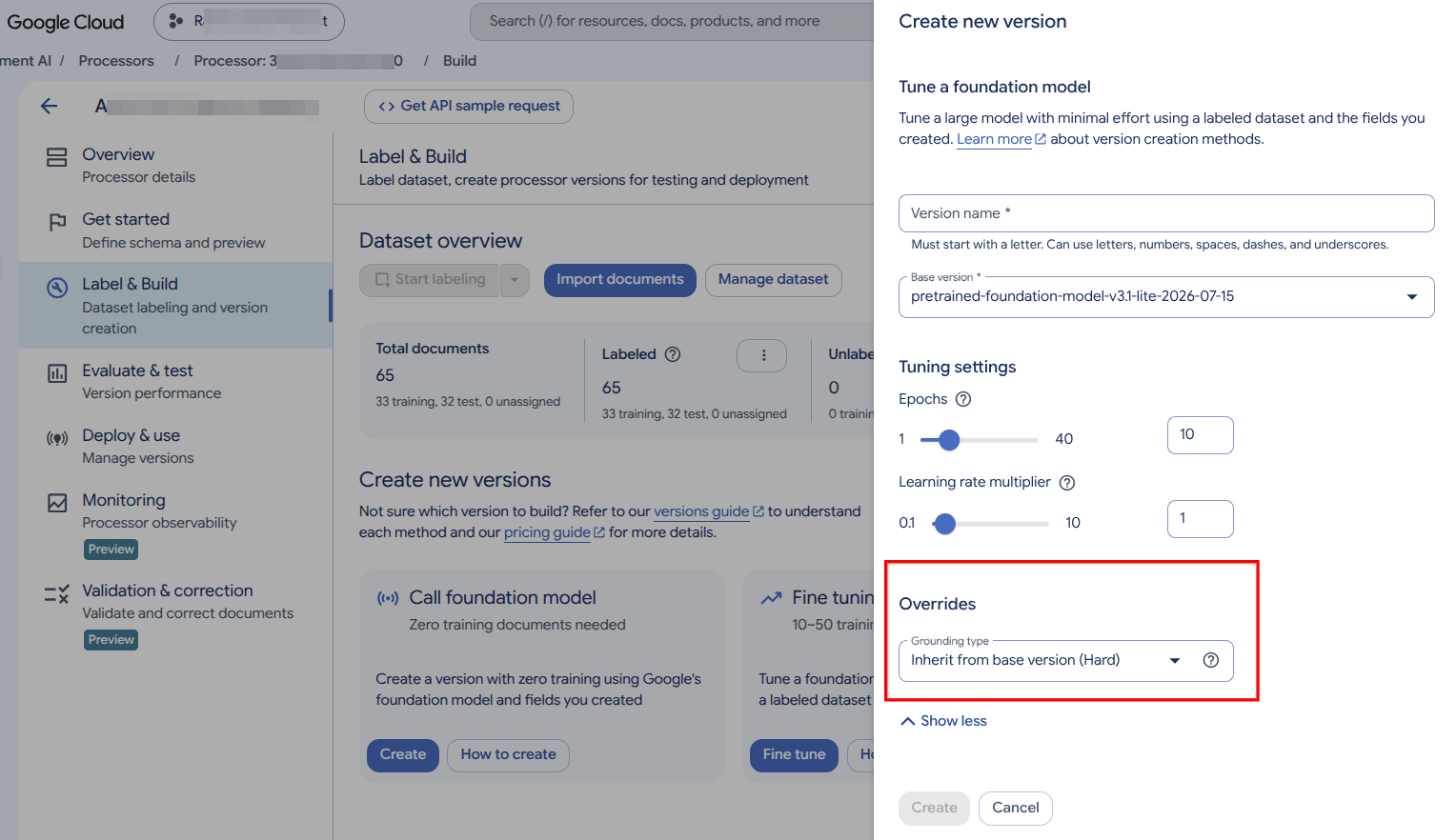
Select Create to create a new version with the selected grounding.
What's next
- Learn about validation and correction.