

This page describes different methods for securing Gateways in Google Kubernetes Engine (GKE). You can also learn how to Secure a Gateway.
How Gateway security works
A Gateway represents the frontend of a load balancer. Depending on your security and compliance requirements, you can help secure traffic through a Gateway in two primary ways:
- TLS termination: the Gateway terminates client TLS connections at the Gateway frontend by using managed or self-managed SSL certificates. The Gateway can optionally re-encrypt traffic between the Gateway and backend Pods by using a BackendTLSPolicy.
- TLS passthrough: encrypted TLS traffic passes directly through the Gateway to backend Pods without the load balancer terminating or decrypting the traffic. You use TLSRoute resources to route traffic based on the Server Name Indication (SNI) hostname.
This page describes how to secure the client to Gateway path using certificates uploaded and managed at the Gateway level, and how to configure end-to-end TLS passthrough. To learn how to secure Gateway to Pod traffic with TLS termination, see Secure load balancer to application traffic using TLS.
TLS termination compared to TLS passthrough
GKE Gateway supports two distinct TLS operating modes depending on whether TLS is decrypted at the load balancer or passed through directly to backend workloads: TLS termination and TLS passthrough.
TLS termination
With TLS termination, the Gateway terminates TLS connections from clients at the load balancer frontend.
When you configure a Gateway listener with the tls.mode field set to
Terminate and the protocol field set to HTTPS, you attach TLS certificates
directly to the Gateway by using Kubernetes Secrets, SSL certificates, or
Certificate Manager.
Key characteristics of TLS termination include the following:
- Layer 7 inspection: because the Gateway decrypts client traffic, it can evaluate HTTP request attributes (such as headers, paths, and methods) and route traffic by using HTTPRoute resources.
- Edge security: it enables integration with Google Cloud Armor security policies, Web Application Firewall (WAF) rules, and Cloud CDN edge caching.
- Backend encryption with BackendTLSPolicy: if your workloads require end-to-end encryption in transit, you can configure a BackendTLSPolicy resource to re-encrypt traffic between the Gateway and backend Pods.
The following diagram shows how a GKE Gateway encrypts both
traffic paths when you use TLS termination with backend encryption. An external
client sends an encrypted HTTPS request (https://example.com) to the Gateway
in a Virtual Private Cloud (VPC) network, where the load balancer terminates
the TLS connection. The load balancer then establishes a separate,
re-encrypted connection to forward the traffic to the backend Store Pods
in the GKE cluster:

In addition to encryption, you can secure the Client-to-Gateway path by using authorization policies. Authorization policies enable a zero-trust architecture by inspecting incoming requests and enforcing access control based on client identities, HTTP headers, and requested paths before the traffic is routed to your backend Pods.
For more information about how to configure TLS termination and backend TLS, see Secure a Gateway.
TLS passthrough
With TLS passthrough, the Gateway proxies encrypted TLS traffic directly to backend workloads without decrypting the payload at the load balancer.
When you configure a Gateway listener with the tls.mode field set to
Passthrough and the protocol field set to TLS, the Gateway does not
terminate TLS or hold SSL certificates. Instead, the load balancer inspects only
the unencrypted Server Name Indication (SNI) hostname in the TLS ClientHello
handshake and routes the raw encrypted TCP stream to backend Pods by using
TLSRoute resources.
Key characteristics of TLS passthrough include the following:
- End-to-end encryption: traffic remains encrypted throughout transit from the client to the backend Pods. The backend application manages certificates, terminates TLS, and decrypts the payload.
- No certificate management needed at Gateway: you don't attach certificates or Kubernetes Secrets to the Gateway listener.
- Layer 4 proxying: the load balancer forwards encrypted TCP streams and routes traffic based on unencrypted TLS handshake metadata (such as the SNI hostname) by using TLSRoute resources.
- Security trade-offs: TLS passthrough works well for compliance requirements where you can't share private keys with cloud infrastructure, or for non-HTTP TLS-based protocols. However, it precludes Layer 7 load balancer inspection and edge security services like Google Cloud Armor WAF rules.
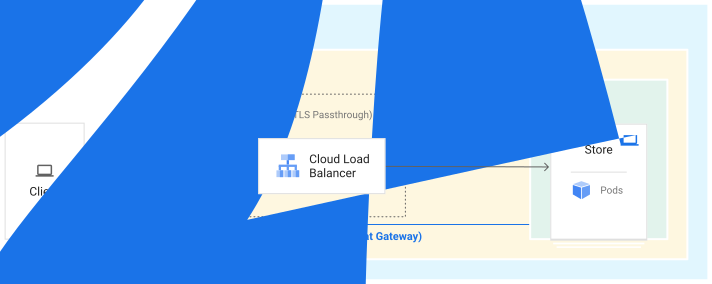
The following diagram shows how Gateway encrypts and routes traffic from the
client to the backend Pods when using TLS passthrough. A client sends an
encrypted TLS request with the store.example.com SNI hostname to the Gateway,
which forwards the encrypted stream without decryption directly to the target
Store Pods:
For more information about how to deploy a TLS passthrough Gateway with TLSRoute, see Deploy a TLS passthrough Gateway.
Benefits
You can secure an application in many different ways using Gateway API, which provides flexibility to different roles interacting with the Gateway.
Who owns domain and TLS configuration?
The Gateway API model introduces two roles that use or deploy Gateways:
- Platform admin: the cluster operator is the administrator for entire clusters. They manage policies, network access, and application permissions.
- Application developer: the application developer defines their application and Service configuration.
The following diagram shows the fields in the Gateway and HTTPRoute resources
that influence TLS and domain ownership for two applications, store-v1 and
store-v2.

In the diagram, the cluster operator controls:
- Which domains application developers can use for their apps in each namespace.
- The specific certificates that terminate different domains.
- Certificates provided by the Gateway owner.
- Whether HTTPRoute owners can specify their own hostnames for certificate generation.
Application developers control the hostname that generates a certificate, if the Gateway definition permits it.
This separation of operational tasks enables application developers to deploy and manage their own HTTPRoute for more distributed control and lets platform administrators deploy and manage Gateways for centralized control of TLS.
Gateway certificate management
You can secure Gateways using any following methods:
If you use Kubernetes Secrets or SslCertificate resources from the
Compute Engine API, you can attach at most 15 certificates to a single Gateway.
Certificate Manager lets you attach up to 10,000,000 certificates per load balancer, if you request a quota increase.
To learn more about Google Cloud SSL certificates, see SSL certificates overview.
Kubernetes Secrets
The
Gateway API spec
supports
Kubernetes Secrets
for storing and attaching certificates to Gateways. You can associate one or
more Kubernetes Secrets with a Gateway using the field
Gateway.spec.tls.certificateRef.
Gateway resources secured through Kubernetes Secrets have the following requirements:
- You must be set the Gateway listener
portandprotocolto443andHTTPS. - You must set the
listener.tls.modefield toTerminate. - You must reference the TLS credentials in the
listeners.tlsblock.
Gateway resources secured using Kubernetes Secrets have the following limitations:
- Only HTTPS listeners terminate traffic using the specified Secrets, although you can specify multiple listeners with a mix of HTTP and HTTPS.
- If you have multiple listeners using HTTPS on the same Gateway, each listener must have a unique hostname.
- You can only omit a single hostname or assign
*for each port and protocol pair. - You can only assign one default certificate for each Gateway.
To learn how to secure a Gateway using a Kubernetes Secret, see Secure a Gateway using a Kubernetes Secret.
SSL certificates
SSL certificates store and deliver certificates to load balancers. An SSL certificate can be either self-managed or Google-managed.
- Self-managed SSL certificates are certificates that you obtain, provision, and renew yourself.
- Google-managed SSL certificates are certificates that Google Cloud obtains, manages, and renews automatically.
To learn more about the differences between these two types of certificates, see SSL certificates overview.
The scope and location of the SSL certificate must match the scope and location of the Gateway that is using it. For example, a global SSL certificate cannot be used by a regional Gateway.
The following table lists the scope and location requirements of SSL certificates for each GatewayClass:
| GatewayClass | SSL certificate scope | SSL certificate location |
|---|---|---|
gke-l7-global-external-managed |
Global SSL certificate | Global |
gke-l7-global-external-managed-mc |
||
gke-l7-gxlb |
||
gke-l7-gxlb-mc |
||
gke-l7-regional-external-managed |
Regional SSL certificate | Must be the same region as the Gateway |
gke-l7-regional-external-managed-mc |
||
gke-l7-cross-regional-internal-managed-mc |
||
gke-l7-rilb |
||
gke-l7-rilb-mc |
Google-managed SSL Certificates aren't compatible with regional Gateways. To secure regional Gateways use Certificate Manager instead.
To learn how to secure a Gateway using an SSL certificate, see Secure a Gateway using an SSL certificate.
Certificate Manager
Certificate Manager is a centralized location to manage your TLS certificates.
When you secure a Gateway using Certificate Manager, you can do the following:
- Reference a
CertificateMapdirectly from a Gateway that you created in Certificate Manager. - Manage your own certificates.
- Improve certificate propagation times.
- Use Cloud Monitoring for expired certificates and certificate propagation.
Certificate Manager supports both self-managed and Google-managed SSL certificates. To learn how to secure a Gateway using Certificate Manager, see Secure a Gateway using Certificate Manager.
GatewayClass TLS support
The following table describes the TLS termination methods that GKE supports for each GatewayClass:
| GatewayClass |
gke-l7-global-external-managedgke-l7-global-external-managed-mcgke-l7-gxlbgke-l7-gxlb-mc
|
gke-l7-regional-external-managedgke-l7-regional-external-managed-mcgke-l7-rilbgke-l7-rilb-mc
|
gke-l7-cross-regional-internal-managed-mc
|
|---|---|---|---|
| Client to Gateway TLS | Supported | Supported | |
| Gateway to backend TLS | Supported | Supported | |
| Google Cloud certificate resource | Global SSL certificateCertificateMap |
Regional SSL certificate | |
| TLS passthrough (TLSRoute) | Not supported | Supported | Supported |
| Self-managed certificates with Kubernetes Secrets | Supported | Supported | Not supported |
| Self-managed Compute Engine SSL certificates | Supported | Supported | Not supported |
| Google-managed Compute Engine SSL certificates | Supported | Not supported | Not supported |
| Self-managed SSL certificates with Certificate Manager | Supported | Supported | Supported |
| Google-managed SSL certificates with Certificate Manager | Supported | Supported | Supported |
Authorization and access control
GKE Gateways support identity-based access control by using the
GCPAuthzPolicy custom resource. This resource lets platform administrators
define explicit ALLOW or DENY rules for north-south traffic.
Additionally, Gateways can integrate with Service Extensions by using the GCPAuthzExtension resource. This resource enables the Gateway to make inline callouts to external, custom, or third-party authorization engines (such as Identity-Aware Proxy) to evaluate requests in real time.
What's next
- Learn how to Deploy a TLS passthrough Gateway.
- Learn how to secure a Gateway.
- Learn how to deploy Gateways.
- Learn more about Gateway API concepts.
- Learn how to configure Gateway resources.