

Connectivity Tests is a diagnostics tool that lets you check connectivity between network endpoints. It analyzes your configuration and, in some cases, performs live data plane analysis between the endpoints. An endpoint is a source or destination of network traffic, such as a VM, Google Kubernetes Engine (GKE) cluster, load balancer forwarding rule, or an IP address on the internet.
To analyze network configurations, Connectivity Tests simulates the expected forwarding path of a packet through your Virtual Private Cloud (VPC) network, Cloud VPN tunnels, or VLAN attachments. Connectivity Tests can also simulate the expected inbound forwarding path to resources in your VPC network.
For some connectivity scenarios, Connectivity Tests also performs live data plane analysis. This feature sends packets over the data plane to validate connectivity and provides baseline diagnostics of latency and packet loss. If the route is supported for the feature, each test that you run includes a live data plane analysis result.
To learn how to create and run tests for various scenarios, see Create and run Connectivity Tests.
The API for Connectivity Tests is the Network Management API. For more information, see the API documentation.
Why use Connectivity Tests?
Connectivity Tests can help you troubleshoot the following network connectivity issues:
- Unintended inconsistent configurations
- Obsolete configurations caused by network configuration changes or migrations
- Configuration errors for a variety of network services and functions
When testing Google-managed services, Connectivity Tests can also help you determine whether there is an issue in your VPC network or in the Google-owned VPC network used for the service resources.
How Connectivity Tests analyzes configurations
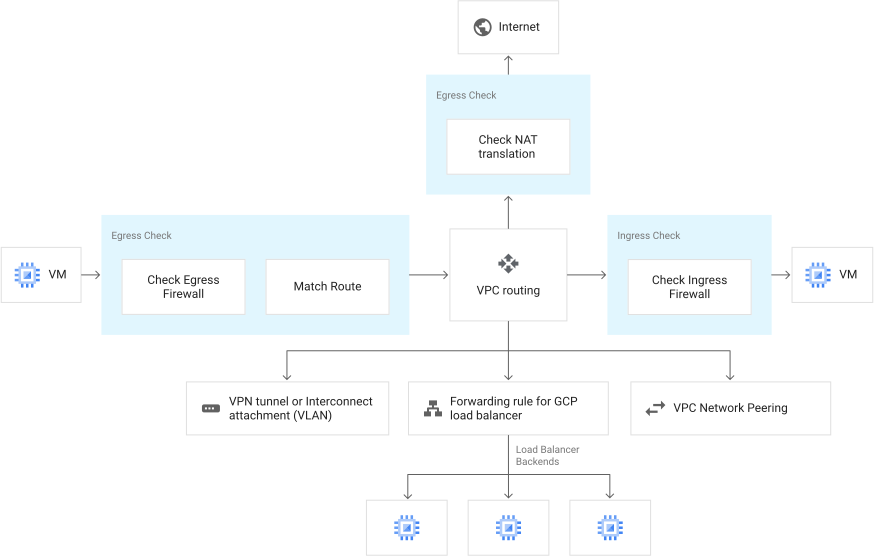
When analyzing network configurations, Connectivity Tests uses an abstract state machine to model how a VPC network should process packets. Google Cloud processes a packet in several logical steps.
The analysis can take many possible paths
Because of the variety of VPC network services and features that the configuration analysis supports, a test packet traversing a VPC network configuration can take many possible paths.
The following diagram shows a model for how the configuration analysis simulates trace traffic between two Compute Engine instances—one on the left and another on the right.
The analysis depends on your network infrastructure
Depending on your Google Cloud network and resource configurations, this traffic might go through a Cloud VPN tunnel, a VPC network, a Google Cloud load balancer, or a peered VPC network before reaching the destination Compute Engine instance.
The analysis follows one of the many finite states
The bounded number of steps between discrete states until a packet has been delivered or dropped is modeled as a finite state machine. This finite state machine can be in exactly one of many finite states at any one time and might have multiple successor states.
For example, when Connectivity Tests matches several routes according to route precedence, Google Cloud can choose a route among several routes based on an unspecified hashing function in the data plane. If a policy-based route is configured, Connectivity Test routes the packet to the next hop, which is an internal load balancer.
In the previous case, the Connectivity Tests trace returns all of the possible routes but can't determine the method Google Cloud used to return the routes. This is because that method is internal to Google Cloud and is subject to change.
Google-managed services
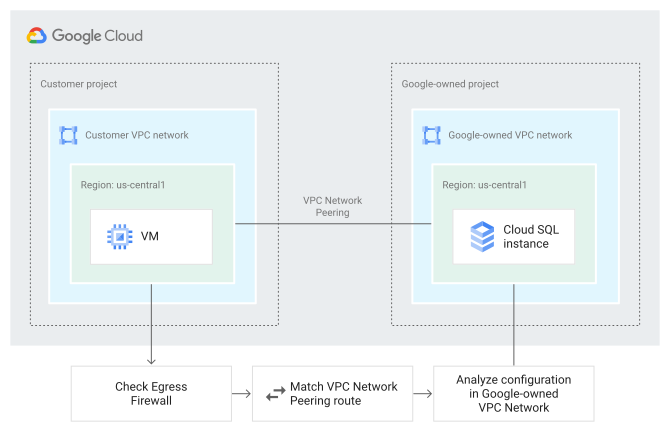
Google-managed services, such as Cloud SQL and Google Kubernetes Engine (GKE), allocate resources for customers in projects and VPC networks that Google owns and manages. Customers don't have permission to access these resources.
The Connectivity Tests configuration analysis can still run a test and provide an overall reachability result for Google-managed services, but it doesn't provide details for the tested resources in the project owned by Google.
The following diagram shows a model for how the configuration analysis simulates trace traffic from a Compute Engine instance in a customer VPC network to a Cloud SQL instance in the Google-owned VPC network. In this example, the networks are connected through VPC Network Peering.
Similar to a standard test between two Compute Engine instances, the logical steps include checking the relevant egress firewall rules and matching the route. When you run a test, Connectivity Tests configuration analysis provides details about these steps. However, for the final logical step of analyzing the configuration in the Google-owned VPC network, the analysis provides only an overall reachability result. Connectivity Tests doesn't provide details for the resources in the Google-owned project because you don't have permission to view them.
For more information, see the test examples in Test connectivity to and from Google-managed services.
How Connectivity Tests analyzes the live data plane
Live data plane analysis tests connectivity by sending multiple TCP or UDP probe packets from the source endpoint to the destination. If the destination isn't a Google Cloud resource, connectivity is tested between the source endpoint and the network edge location.
The live data plane analysis results show you the number of probes sent, the number of probes that successfully reached the destination, and a reachability status. This status is determined based on how many probes were successfully delivered, as described in the following table.
| Status | Number of probes that reached their destination |
|---|---|
| Reachable | At least 95% |
| Unreachable | None |
| Partially reachable | More than 0 and less than 95% |
In addition to showing how many packets were successfully delivered, live data plane analysis also shows median and 95th percentile one-way latency information. When the destination is an internet IP address, live data plane analysis sends probes and shows the results for each Google network edge router that traffic might be routed through.
Live data plane analysis might not cover all possible networking paths:
- If the destination endpoint is a Google Cloud load balancer with multiple backends, each live data plane analysis probe is sent to a random backend. Some backends can be tested by many probes while other backends might not be tested at all.
- In case of equal-cost multipath (ECMP) routing, each live data plane analysis probe is forwarded by a random route. Some routing paths can be tested by many probes while other routing paths might not be tested at all.
- The number of live data plane analysis probes doesn't depend on the number of existing networking paths, and there might not be a sufficient number of live data plane analysis probes to test each possible path.
If you see apparent discrepancies between the configuration analysis and live data plane analysis results, see Troubleshoot Connectivity Tests.
Supported endpoints
The tables in the following sections summarize the source and destination endpoints that Connectivity Tests supports. For the Google Cloud networking configurations and features that Connectivity Tests analyzes when running tests, see Supported networking configurations.
Source endpoints
The following table summarizes the source endpoints that Connectivity Tests configuration and live data plane analysis support.
| Source endpoint | Configuration analysis | Live data plane analysis |
|---|---|---|
| Compute Engine VM instance | (only for running instances) |
|
| GKE cluster control plane | ||
| GKE Pod | ||
| Cloud Run service | 1 | |
| Cloud Run job | 1 | |
| Cloud Run functions (1st gen) | 1 | |
| App Engine standard environment | 1 | |
| Cloud SQL instance | ||
| Database Migration Service private connection | ||
| Internal IP address in a VPC network2 | (only for supported Google Cloud resources) |
|
| External IP address3 | (only for supported Google Cloud resources) |
|
| Internal IP address in a non-Google Cloud network (connected to a VPC network through Cloud Interconnect, Cloud VPN, or Router appliance) |
The following additional considerations apply to source endpoints:
- For Compute Engine VM instances, live data plane analysis is supported only for running instances. It isn't supported when the source and destination endpoints are the same VM instance.
- For GKE cluster control planes and Cloud SQL instances, Connectivity Tests supports only endpoints that don't use Private Service Connect.
- Cloud Run functions, formerly Cloud Functions (2nd gen), isn't supported. However, you can test connectivity from a Cloud Run function by creating a Connectivity Test for the underlying Cloud Run revision. A Cloud Run revision is created every time a Cloud Run function is deployed.
Destination endpoints
The following table summarizes the destination endpoints that Connectivity Tests configuration and live data plane analysis support.
| Destination endpoint | Configuration analysis | Live data plane analysis |
|---|---|---|
| Compute Engine VM instance | (only for running instances) |
|
| GKE cluster control plane | (only for internal IP addresses) |
|
| GKE Pod | ||
| Internal and external Application Load Balancer | ||
| Internal and external Proxy Network Load Balancer | ||
| Internal passthrough Network Load Balancer | ||
| External passthrough Network Load Balancer | ||
| Private Service Connect endpoint | (only for published services with a producer internal passthrough Network Load Balancer) |
|
| Cloud SQL instance | (only for internal IP addresses) |
|
| Memorystore for Redis instance | ||
| Memorystore for Redis Cluster | ||
| Internal IP address in a VPC network1 | (only for supported Google Cloud resources) |
|
| External IP address2 | (only for internet IP addresses and supported Google Cloud resources) |
|
| Internal IP address in a non-Google Cloud network (connected to a VPC network through Cloud Interconnect) | ||
| Internal IP address in a non-Google Cloud network (connected to a VPC network through Cloud VPN or Router appliance) |
The following additional considerations apply to destination endpoints:
- For Compute Engine VM instances, live data plane analysis is supported only for running instances. It isn't supported when the source and destination endpoints are the same VM instance.
- Connectivity Tests supports Cloud SQL external server replicas that are defined by IP addresses.
- For internet IP addresses and internal IP addresses in a non-Google Cloud network that is connected through Cloud Interconnect, live data plane analysis tests connectivity up to the network edge location or VLAN attachment for Cloud Interconnect, respectively.
Considerations and constraints
Evaluate the following considerations when deciding whether to use Connectivity Tests.
- The configuration analysis that Connectivity Tests performs is based entirely on configuration information for Google Cloud resources and might not represent the actual condition or status of the data plane for a VPC network.
- While Connectivity Tests does acquire some dynamic configuration information, such as the Cloud VPN tunnel state and dynamic routes that are on Cloud Router, it does not access or maintain the health state of Google internal production infrastructure and data plane components.
- A status of
Packet could be deliveredfor a Connectivity Test does not guarantee that traffic can pass through the data plane. The purpose of the test is to validate configuration issues that can cause traffic to drop.
For supported routes, the live data plane analysis results supplement the configuration analysis results by testing whether transmitted packets arrive at the destination.
Connectivity Tests has no knowledge of networks outside of Google Cloud
Outside networks are defined as the following:
- On-premises networks that reside in your data center or other facility where you operate your hardware devices and software applications.
- Other cloud providers where you run resources.
- A host on the internet that sends traffic to your VPC network.
Connectivity Tests doesn't perform firewall connection tracking
Connection tracking for VPC firewalls stores information about new and established connections and enables allowing or restricting subsequent traffic based on that information.
The Connectivity Tests configuration analysis doesn't support firewall connection tracking because the firewall connection table is located in the data plane for a Compute Engine instance and is inaccessible. However, the configuration analysis can simulate connection tracking by allowing a return connection that would normally be denied by an ingress firewall rule, as long as Connectivity Tests initiates the outbound connection.
Live data plane analysis doesn't support testing firewall connection tracking.
Connectivity Tests can't test Compute Engine instances configured to modify forwarding behavior
Connectivity Tests can't test Compute Engine instances that have been configured to act in the data plane as routers, firewalls, NAT gateways, or VPNs. This type of configuration makes it difficult to assess the environment running on the Compute Engine instance. Additionally, live data plane analysis doesn't support this type of testing scenario.
Connectivity Tests result times can vary
Getting Connectivity Tests results can take from 30 seconds to up to 10 minutes. The time a test takes is based on the size of your VPC network configuration and the number of Google Cloud resources that you use.
The following table shows response times that you can expect for all users running a test against a sample configuration in a query. This configuration contains Compute Engine instances, a Cloud VPN tunnel, and Google Cloud load balancers.
| Project size | Number of Google Cloud resources | Response latency |
|---|---|---|
| Small project | Fewer than 50 | 60 seconds for 95% of queries from all users |
| Medium project | Greater than 50 but fewer than 5000 | 120 seconds for 95% of queries from all users |
| Large project | Greater than 5000 | 600 seconds for 95% of queries from all users |
Live data plane analysis is not intended for continuous monitoring
Live data plane analysis performs one-time verification of network connectivity for diagnostic purposes. For continuous monitoring of connectivity and packet loss, use Performance Dashboard.
VPC Service Controls support
VPC Service Controls can provide additional security for Connectivity Tests to help mitigate the risk of data exfiltration. Using VPC Service Controls, you can add projects to service perimeters that protect resources and services from requests that originate outside the perimeter.
To learn more about service perimeters, see the Service perimeter details and configuration page of the VPC Service Controls documentation.