


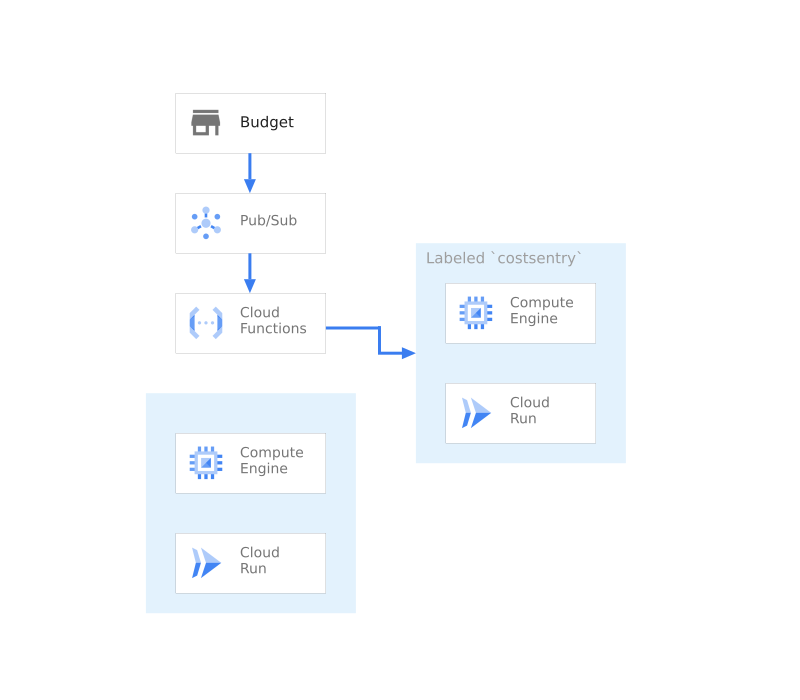
Cost Sentry הוא אוסף של סקריפטים והגדרות שמאפשרים להשבית משאבים כשחורגים מהתקציבים שמוגדרים בחיוב ב-Google Cloud.
הסקריפט הזה כולל את הרכיבים הבאים :
- אירועים – תור – Pub/Sub
- חיוב – אמצעי בקרה של עלויות – תקציבים
- אירועים – טיפול באירועים – Cloud Functions
- מחשוב – מכונות וירטואליות – Compute Engine
- Compute – Serverless – Cloud Run
הסקריפט הזה יגדיר תקציב, תור להעברת הודעות ופונקציית Cloud כדי לנהל את כל זה. לאחר מכן, המערכת מפעילה מכונה וירטואלית לדוגמה ושירות נתמך בקונטיינר שמנוהל על ידי המערכת.
שנתחיל?
כדי להעתיק את קוד המקור ב-Cloud Shell, לוחצים על הקישור הבא. אחרי שמגיעים לשם, פקודה אחת תתחיל הרצה של עותק עובד של האפליקציה בפרויקט.

הרכיבים של Cost Sentry
הארכיטקטורה של Cost Sentry מתבססת על כמה מוצרים. ברשימה הבאה מפורטים הרכיבים, וגם מידע נוסף על הרכיבים, כולל קישורים לסרטונים קשורים, למסמכי מוצר ולמדריכים אינטראקטיביים.


סקריפטים
סקריפט ההתקנה משתמש בקובץ הפעלה שנכתב ב-go ובכלים של Terraform CLI כדי לקחת פרויקט ריק ולהתקין בו את האפליקציה. הפלט צריך להיות אפליקציה פעילה וכתובת URL לכתובת ה-IP של איזון העומסים.
./main.tf
הפעלת שירותים
שירותי Google Cloud מושבתים בפרויקט כברירת מחדל. כדי להשתמש ב-Cost Sentry, צריך להפעיל את השירותים הבאים:
- תקציבים לחיוב – מעקב אחרי החיובים וניהול התראות לגבי חיובים.
- Cloud Build – יצירת קובצי אימג' של קונטיינרים ופריסה ב-Cloud Run.
- Compute Engine – הטמעה של מכונות וירטואליות ושירותי רשת, כמו איזון עומסים.
- Cloud Functions – תגובה לאירועים בפלטפורמת השירות.
- Cloud Run – אירוח קונטיינרים בסביבה בלי שרת (serverless), ומתן כתובות URL לגישה לאפליקציה.
variable "gcp_service_list" {
        description = "The list of apis necessary for the project"
        type        = list(string)
        default = [
            "cloudresourcemanager.googleapis.com",
            "cloudbilling.googleapis.com",
            "billingbudgets.googleapis.com",
            "cloudbuild.googleapis.com",
            "compute.googleapis.com",
            "cloudfunctions.googleapis.com",
            "storage.googleapis.com",
            "run.googleapis.com"
        ]
}

resource "google_project_service" "all" {
    for_each           = toset(var.gcp_service_list)
    project            = var.project_number
    service            = each.key
    disable_on_destroy = false
}
יצירת ערוץ Pub/Sub
יצירת ערוץ Pub/Sub להאזנה לאירועים של תקציב לחיוב ותגובה באמצעות Cloud Functions
resource "google_pubsub_topic" "costsentry" {
    name = "${var.basename}-billing-channel"
    project    = var.project_number
}
יצירת שירות Cloud Run כדי לאכוף
יוצרים שירות לדוגמה ב-Cloud Run שבו יופעל אכיפת החיוב.
resource "google_cloud_run_service" "app" {
    name     = "${var.basename}-run-service"
    location = var.region
    project  = var.project_id

    metadata {
        labels = {"${var.label}"=true}
    }

    template {
        spec {
            containers {
                image = "us-docker.pkg.dev/cloudrun/container/hello"
            }
        }

        metadata {
            annotations = {
                "autoscaling.knative.dev/maxScale" = "1000"
                "run.googleapis.com/client-name"   = "terraform"
            }
        }
    }
    autogenerate_revision_name = true
    depends_on = [google_project_service.all]
}
יצירת מופע של VM
יוצרים מכונה לדוגמה של Compute Engine להרצת האכיפה.
resource "google_compute_instance" "example" {
    name         = "${var.basename}-example"
    machine_type = "n1-standard-1"
    zone         = var.zone
    project      = var.project_id
    tags                    = ["http-server"]
    labels = {"${var.label}"=true}

    boot_disk {
        auto_delete = true
        device_name = "${var.basename}-example"
        initialize_params {
            image = "family/debian-10"
            size  = 200
            type  = "pd-standard"
        }
    }

    network_interface {
        network = "default"
        access_config {
        // Ephemeral public IP
        }
    }

    depends_on = [google_project_service.all]
}
יצירת תקציב
יצירת תקציב למעקב אחרי ההוצאות בפרויקטים.
provisioner "local-exec" {
    command = <<-EOT
    gcloud beta billing budgets create --display-name ${var.basename}-budget \
    --billing-account ${var.billing_account} --budget-amount ${var.budgetamount} \
    --all-updates-rule-pubsub-topic=projects/${var.project_id}/topics/${var.basename}-billing-channel
    EOT
}
יצירה של חשבון שירות והגדרת הרשאות
יוצר חשבון שירות לקריאות של Cloud Functions.
resource "google_service_account" "functions_accounts" {
    account_id   = local.safunctionuser
    description  = "Service Account for the costsentry to run as"
    display_name = local.safunction
    project      = var.project_number
}
הגדרת ההרשאות
הפקודה הבאה מגדירה הרשאות ותפקידים ב-IAM שמאפשרים ל-Cloud Build לפרוס את השירותים הנדרשים.
סדרת הפקודות מבצעת את הפעולות הבאות: נותנת הרשאה לחשבון השירות של Cloud Functions לנהל את Cloud Run. ההרשאה מאפשרת לחשבון השירות של Cloud Functions להפסיק מכונות וירטואליות ב-Compute Engine. ההרשאה מאפשרת לחשבון השירות של Cloud Build לפעול בשם חשבון השירות של Compute.
variable "build_roles_list" {
        description = "The list of roles that fucntions needs for"
        type        = list(string)
        default = [
            "roles/run.admin",
            "roles/compute.instanceAdmin",
            "roles/iam.serviceAccountUser"
        ]
}

resource "google_project_iam_member" "allbuild" {
    for_each   = toset(var.build_roles_list)
    project    = var.project_number
    role       = each.key
    member     = "serviceAccount:${google_service_account.functions_accounts.email}"
    depends_on = [google_project_service.all,google_service_account.functions_accounts]
}
פריסת פונקציה של Cloud Functions
הפקודה הבאה פורסת פונקציה ב-Cloud Functions שמשביתה משאבים כשמופעלת התראה.
resource "google_storage_bucket" "function_bucket" {
    name     = "${var.project_id}-function-deployer"
    project  = var.project_number
    location = var.location
}

resource "null_resource" "cloudbuild_function" {
    provisioner "local-exec" {
        command = <<-EOT
        cp code/function/function.go .
        cp code/function/go.mod .
        zip index.zip function.go
        zip index.zip go.mod
        rm go.mod
        rm function.go
        EOT
    }

    depends_on = [
        google_project_service.all
    ]
}

resource "google_storage_bucket_object" "archive" {
    name   = "index.zip"
    bucket = google_storage_bucket.function_bucket.name
    source = "index.zip"
    depends_on = [
        google_project_service.all,
        google_storage_bucket.function_bucket,
        null_resource.cloudbuild_function
    ]
}

resource "google_cloudfunctions_function" "function" {
    name    = var.basename
    project = var.project_id
    region  = var.region
    runtime = "go116"
    service_account_email = google_service_account.functions_accounts.email
    available_memory_mb   = 128
    source_archive_bucket = google_storage_bucket.function_bucket.name
    source_archive_object = google_storage_bucket_object.archive.name
    entry_point           = "LimitUsage"
    event_trigger {
        event_type = "google.pubsub.topic.publish"
        resource   = google_pubsub_topic.costsentry.name
    }

    environment_variables = {
        GOOGLE_CLOUD_PROJECT = var.project_id
        LABEL= var.label
    }

    depends_on = [
        google_storage_bucket.function_bucket,
        google_storage_bucket_object.archive,
        google_project_service.all
    ]
}
סיכום
אחרי ההרצה, אמור להיות לכם פתרון לבקרת עלויות שפועל בפרויקט. בנוסף, צריך שיהיה לכם את כל הקוד כדי לשנות או להרחיב את הפתרון הזה כך שיתאים לסביבה שלכם.