


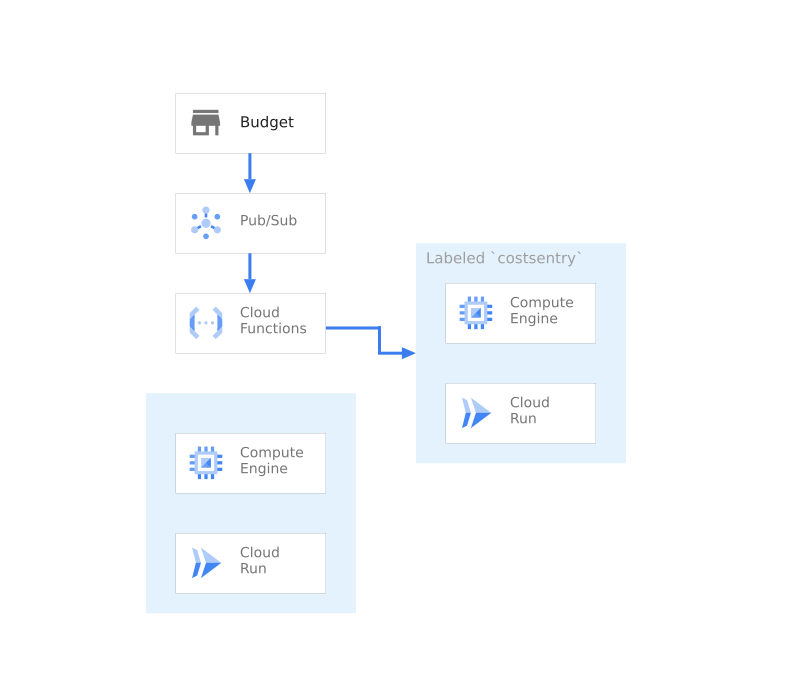
Cost Sentry 是一組指令碼和設定,可讓您在超出 Google Cloud Billing 預算時關閉資源。
這個指令碼包含下列元件:
- 事件 - 佇列 - Pub/Sub
- 帳單 - 費用控管 - 預算
- 事件 - 事件處理 - Cloud Functions
- 運算 - VM - Compute Engine
- 運算 - 無伺服器 - Cloud Run
這項指令碼會設定預算、訊息佇列和 Cloud Function,以便管理所有這些項目。接著,系統會啟動範例 VM 和容器支援的服務。
開始使用
按一下下列連結,即可在 Cloud Shell 中複製原始碼。完成後,只要執行單一指令,即可在專案中啟動應用程式的工作副本。

Cost Sentry 元件
Cost Sentry 架構會使用多項產品。 下表列出各項元件,並提供元件的相關資訊,包括相關影片、產品說明文件和互動式導覽的連結。


指令碼
安裝指令碼會使用以 go 撰寫的可執行檔和 Terraform CLI 工具,在空白專案中安裝應用程式。輸出內容應為可運作的應用程式,以及負載平衡 IP 位址的網址。
./main.tf
啟用服務
專案預設會停用 Google Cloud 服務。如要使用 Cost Sentry,請啟用下列服務:
- 帳單預算 - 追蹤帳單並管理帳單快訊。
- Cloud Build - 建立容器映像檔並部署至 Cloud Run。
- Compute Engine:實作虛擬機器和網路服務,例如負載平衡。
- Cloud Functions - 回應服務平台事件。
- Cloud Run - 在無伺服器環境中代管容器,並提供存取應用程式的網址。
variable "gcp_service_list" {
        description = "The list of apis necessary for the project"
        type        = list(string)
        default = [
            "cloudresourcemanager.googleapis.com",
            "cloudbilling.googleapis.com",
            "billingbudgets.googleapis.com",
            "cloudbuild.googleapis.com",
            "compute.googleapis.com",
            "cloudfunctions.googleapis.com",
            "storage.googleapis.com",
            "run.googleapis.com"
        ]
}

resource "google_project_service" "all" {
    for_each           = toset(var.gcp_service_list)
    project            = var.project_number
    service            = each.key
    disable_on_destroy = false
}
建立 Pub/Sub 管道
建立 Pub/Sub 管道,監聽帳單預算事件,並使用 Cloud Functions 回應
resource "google_pubsub_topic" "costsentry" {
    name = "${var.basename}-billing-channel"
    project    = var.project_number
}
建立 Cloud Run 服務來強制執行
建立範例 Cloud Run 服務,用於執行計費強制措施。
resource "google_cloud_run_service" "app" {
    name     = "${var.basename}-run-service"
    location = var.region
    project  = var.project_id

    metadata {
        labels = {"${var.label}"=true}
    }

    template {
        spec {
            containers {
                image = "us-docker.pkg.dev/cloudrun/container/hello"
            }
        }

        metadata {
            annotations = {
                "autoscaling.knative.dev/maxScale" = "1000"
                "run.googleapis.com/client-name"   = "terraform"
            }
        }
    }
    autogenerate_revision_name = true
    depends_on = [google_project_service.all]
}
建立 VM 執行個體
建立範例 Compute Engine 執行個體,以便執行強制執行作業。
resource "google_compute_instance" "example" {
    name         = "${var.basename}-example"
    machine_type = "n1-standard-1"
    zone         = var.zone
    project      = var.project_id
    tags                    = ["http-server"]
    labels = {"${var.label}"=true}

    boot_disk {
        auto_delete = true
        device_name = "${var.basename}-example"
        initialize_params {
            image = "family/debian-10"
            size  = 200
            type  = "pd-standard"
        }
    }

    network_interface {
        network = "default"
        access_config {
        // Ephemeral public IP
        }
    }

    depends_on = [google_project_service.all]
}
設定預算
建立預算,監控專案支出。
provisioner "local-exec" {
    command = <<-EOT
    gcloud beta billing budgets create --display-name ${var.basename}-budget \
    --billing-account ${var.billing_account} --budget-amount ${var.budgetamount} \
    --all-updates-rule-pubsub-topic=projects/${var.project_id}/topics/${var.basename}-billing-channel
    EOT
}
建立服務帳戶並設定權限
建立服務帳戶,用於 Cloud Functions 呼叫。
resource "google_service_account" "functions_accounts" {
    account_id   = local.safunctionuser
    description  = "Service Account for the costsentry to run as"
    display_name = local.safunction
    project      = var.project_number
}
設定權限
下列指令會設定 IAM 角色和權限,允許 Cloud Build 部署必要服務。
這一連串指令會執行下列動作: 授予 Cloud Functions 服務帳戶管理 Cloud Run 的權限。 授予 Cloud Functions 服務帳戶停止 Compute Engine 執行個體的權限。 將權限授予 Cloud Build 服務帳戶,代表 Compute 服務帳戶執行動作。
variable "build_roles_list" {
        description = "The list of roles that fucntions needs for"
        type        = list(string)
        default = [
            "roles/run.admin",
            "roles/compute.instanceAdmin",
            "roles/iam.serviceAccountUser"
        ]
}

resource "google_project_iam_member" "allbuild" {
    for_each   = toset(var.build_roles_list)
    project    = var.project_number
    role       = each.key
    member     = "serviceAccount:${google_service_account.functions_accounts.email}"
    depends_on = [google_project_service.all,google_service_account.functions_accounts]
}
部署 Cloud 函式
下列指令會部署 Cloud 函式,在觸發快訊時停用資源。
resource "google_storage_bucket" "function_bucket" {
    name     = "${var.project_id}-function-deployer"
    project  = var.project_number
    location = var.location
}

resource "null_resource" "cloudbuild_function" {
    provisioner "local-exec" {
        command = <<-EOT
        cp code/function/function.go .
        cp code/function/go.mod .
        zip index.zip function.go
        zip index.zip go.mod
        rm go.mod
        rm function.go
        EOT
    }

    depends_on = [
        google_project_service.all
    ]
}

resource "google_storage_bucket_object" "archive" {
    name   = "index.zip"
    bucket = google_storage_bucket.function_bucket.name
    source = "index.zip"
    depends_on = [
        google_project_service.all,
        google_storage_bucket.function_bucket,
        null_resource.cloudbuild_function
    ]
}

resource "google_cloudfunctions_function" "function" {
    name    = var.basename
    project = var.project_id
    region  = var.region
    runtime = "go116"
    service_account_email = google_service_account.functions_accounts.email
    available_memory_mb   = 128
    source_archive_bucket = google_storage_bucket.function_bucket.name
    source_archive_object = google_storage_bucket_object.archive.name
    entry_point           = "LimitUsage"
    event_trigger {
        event_type = "google.pubsub.topic.publish"
        resource   = google_pubsub_topic.costsentry.name
    }

    environment_variables = {
        GOOGLE_CLOUD_PROJECT = var.project_id
        LABEL= var.label
    }

    depends_on = [
        google_storage_bucket.function_bucket,
        google_storage_bucket_object.archive,
        google_project_service.all
    ]
}
結論
執行後,您應該會在專案中看到費用控管解決方案。此外,您應該擁有所有程式碼,可修改或擴充這個解決方案,以配合您的環境。