


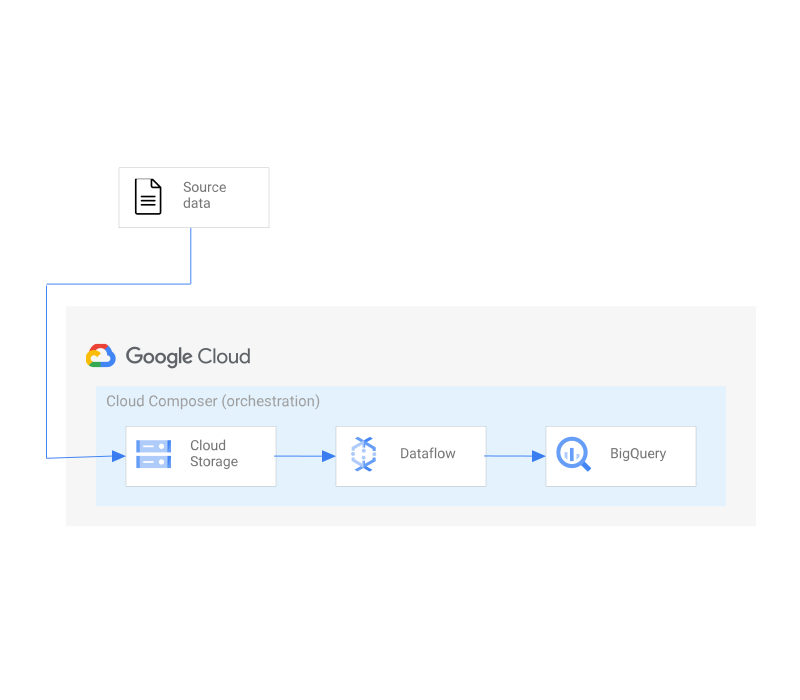
ETL 管道是一種架構,可使用「擷取、轉換、載入」方法執行批次資料處理管道。這個架構包含下列元件:
- Google Cloud Storage,用於處理到達網頁的來源資料
- Dataflow:對來源資料執行轉換作業
- BigQuery:做為轉換後資料的目的地
- Cloud Composer 環境,用於協調 ETL 程序
開始使用
按一下下列連結,即可在 Cloud Shell 中複製原始碼。完成後,只要執行單一指令,即可在專案中啟動應用程式的工作副本。

ETL 管道元件
ETL 管道架構會使用多項產品。 下表列出各項元件,並提供元件的相關資訊,包括相關影片、產品說明文件和互動式導覽的連結。| 影片 | 文件 | 逐步操作說明 | |||
|---|---|---|---|---|---|
 |
BigQuery | BigQuery 是符合成本效益的無伺服器多雲端資料倉儲系統,可協助您將大數據轉化為寶貴的業務深入分析結果。 | |||
 |
Cloud Composer | 以 Apache Airflow 為基礎建構的全代管工作流程自動化調度管理服務。 | |||
 |
Cloud Storage | Cloud Storage 提供檔案儲存空間,並透過 http(s) 公開提供圖片。 |
指令碼
安裝指令碼會使用以 go 撰寫的可執行檔和 Terraform CLI 工具,在空白專案中安裝應用程式。輸出內容應為可運作的應用程式,以及負載平衡 IP 位址的網址。
./main.tf
啟用服務
專案預設會停用 Google Cloud 服務。如要使用本文中的任何解決方案,請先啟用下列項目:
- IAM:管理 Google Cloud 資源的身分和存取權
- 儲存空間:這項服務可讓您在 Google Cloud 中儲存及存取資料
- Dataflow:代管服務,可執行各種資料處理模式
- BigQuery:資料平台,可建立、管理、共用及查詢資料
- Composer:在 Google Cloud 中管理 Apache Airflow 環境
- 運算 - 虛擬機器和網路服務 (Composer 使用)
variable "gcp_service_list" {
  description = "The list of apis necessary for the project"
  type        = list(string)
  default = [
    "dataflow.googleapis.com",
    "compute.googleapis.com",
    "composer.googleapis.com",
    "storage.googleapis.com",
    "bigquery.googleapis.com",
    "iam.googleapis.com"
  ]
}

resource "google_project_service" "all" {
  for_each           = toset(var.gcp_service_list)
  project            = var.project_number
  service            = each.key
  disable_on_destroy = false
}
建立服務帳戶
建立供 Composer 和 Dataflow 使用的服務帳戶。
resource "google_service_account" "etl" {
  account_id   = "etlpipeline"
  display_name = "ETL SA"
  description  = "user-managed service account for Composer and Dataflow"
  project = var.project_id
  depends_on = [google_project_service.all]
}
指派角色
將服務帳戶所需的角色授予服務帳戶,並將 Cloud Composer v2 API 服務代理擴充角色授予 Cloud Composer 服務代理 (Composer 2 環境需要此角色)。
variable "build_roles_list" { description = "The list of roles that Composer and Dataflow needs" type = list(string) default = [ "roles/composer.worker", "roles/dataflow.admin", "roles/dataflow.worker", "roles/bigquery.admin", "roles/storage.objectAdmin", "roles/dataflow.serviceAgent", "roles/composer.ServiceAgentV2Ext" ] }
resource "google_project_iam_member" "allbuild" {
  project    = var.project_id
  for_each   = toset(var.build_roles_list)
  role       = each.key
  member     = "serviceAccount:${google_service_account.etl.email}"
  depends_on = [google_project_service.all,google_service_account.etl]
}

resource "google_project_iam_member" "composerAgent" {
  project    = var.project_id
  role       = "roles/composer.ServiceAgentV2Ext"
  member     = "serviceAccount:service-${var.project_number}@cloudcomposer-accounts."
  depends_on = [google_project_service.all]
}
建立 Composer 環境
Airflow 必須仰賴許多微服務才能執行,因此 Cloud Composer 會佈建 Google Cloud 元件來執行工作流程。這些元件統稱為 Cloud Composer 環境。
# Create Composer environment
resource "google_composer_environment" "example" {
  project   = var.project_id
  name      = "example-environment"
  region    = var.region
  config {

    software_config {
      image_version = "composer-2.0.12-airflow-2.2.3"
      env_variables = {
        AIRFLOW_VAR_PROJECT_ID  = var.project_id
        AIRFLOW_VAR_GCE_ZONE    = var.zone
        AIRFLOW_VAR_BUCKET_PATH = "gs://${var.basename}-${var.project_id}-files"
      }
    }
    node_config {
      service_account = google_service_account.etl.name
    }
  }
  depends_on = [google_project_service.all, google_service_account.etl, google_project_iam_member.allbuild, google_project_iam_member.composerAgent]
}
建立 BigQuery 資料集和資料表
在 BigQuery 中建立資料集和資料表,儲存處理後的資料,並用於分析。
resource "google_bigquery_dataset" "weather_dataset" {
  project    = var.project_id
  dataset_id = "average_weather"
  location   = "US"
  depends_on = [google_project_service.all]
}

resource "google_bigquery_table" "weather_table" {
  project    = var.project_id
  dataset_id = google_bigquery_dataset.weather_dataset.dataset_id
  table_id   = "average_weather"
  deletion_protection = false

  schema     = <<EOF
[
  {
    "name": "location",
    "type": "GEOGRAPHY",
    "mode": "REQUIRED"
  },
  {
    "name": "average_temperature",
    "type": "INTEGER",
    "mode": "REQUIRED"
  },
   {
    "name": "month",
    "type": "STRING",
    "mode": "REQUIRED"
  },
   {
    "name": "inches_of_rain",
    "type": "NUMERIC",
    "mode": "NULLABLE"
  },
   {
    "name": "is_current",
    "type": "BOOLEAN",
    "mode": "NULLABLE"
  },
   {
    "name": "latest_measurement",
    "type": "DATE",
    "mode": "NULLABLE"
  }
]
EOF
  depends_on = [google_bigquery_dataset.weather_dataset]
}
建立 Cloud Storage bucket 並新增檔案
建立儲存空間值區,存放管道所需的檔案,包括來源資料 (inputFile.txt)、目標結構定義 (jsonSchema.json) 和轉換用的使用者定義函式 (transformCSCtoJSON.js)。
# Create Cloud Storage bucket and add files
resource "google_storage_bucket" "pipeline_files" {
  project       = var.project_number
  name          = "${var.basename}-${var.project_id}-files"
  location      = "US"
  force_destroy = true
  depends_on    = [google_project_service.all]
}

resource "google_storage_bucket_object" "json_schema" {
  name       = "jsonSchema.json"
  source     = "${path.module}/files/jsonSchema.json"
  bucket     = google_storage_bucket.pipeline_files.name
  depends_on = [google_storage_bucket.pipeline_files]
}

resource "google_storage_bucket_object" "input_file" {
  name       = "inputFile.txt"
  source     = "${path.module}/files/inputFile.txt"
  bucket     = google_storage_bucket.pipeline_files.name
  depends_on = [google_storage_bucket.pipeline_files]
}

resource "google_storage_bucket_object" "transform_CSVtoJSON" {
  name       = "transformCSVtoJSON.js"
  source     = "${path.module}/files/transformCSVtoJSON.js"
  bucket     = google_storage_bucket.pipeline_files.name
  depends_on = [google_storage_bucket.pipeline_files]
}
上傳 DAG 檔案
首先,使用資料來源判斷適合新增 DAG 檔案的 Cloud Storage bucket 路徑,然後將 DAG 檔案新增至 bucket。DAG 檔案會定義工作流程、依附元件和排程,供 Airflow 協調管理管道。
data "google_composer_environment" "example" {
  project    = var.project_id
  region     = var.region
  name       = google_composer_environment.example.name
  depends_on = [google_composer_environment.example]
}

resource "google_storage_bucket_object" "dag_file" {
  name       = "dags/composer-dataflow-dag.py"
  source     = "${path.module}/files/composer-dataflow-dag.py"
  bucket     = replace(replace(data.google_composer_environment.example.config.0.dag_gcs_prefix, "gs://", ""),"/dags","")
  depends_on = [google_composer_environment.example, google_storage_bucket.pipeline_files, google_bigquery_table.weather_table]
}
結論
執行後,您現在應該已設定 Composer 環境,可對範例中顯示的資料執行 ETL 工作。此外,您應擁有所有程式碼,以便修改或擴充這個解決方案,使其符合您的環境。