

Underlay VPC networking, Layer 2 MAC learning, and DNS
This document describes underlay Virtual Private Cloud (VPC) networking, Layer 2 broadcast emulation, IP address management (IPAM), and Domain Name System (DNS) architecture in VMware solution on Google Cloud.
In VMware solution, host-level networking maps VMware ESXi VMkernel interfaces to Compute Engine primary and dynamic virtual network interfaces (vNICs). Each host uses dedicated Virtual Private Cloud (VPC) subnets, 802.1Q VLAN tagging, Layer 2 MAC learning, and internal IPAM.
Core subnets and traffic segmentation
To isolate network traffic classes in VMware Cloud Foundation (VCF), you must provision dedicated underlay subnets, as shown in the following diagram (click to enlarge):
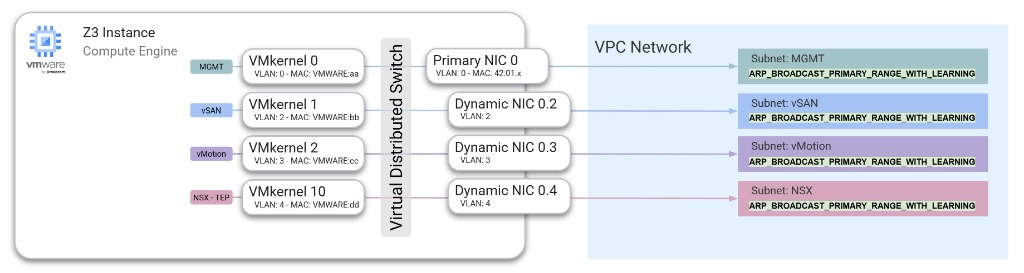
A standard VCF cluster requires a minimum of four dedicated VPC subnets, as shown in the following table:
| Subnet class | Traffic type | VLAN mapping | Purpose |
|---|---|---|---|
Management
(MGMT)
|
Underlay control | Native (untagged) | Carries ESXi host
management traffic
(vmk0) and hosts
SDDC Manager,
vCenter Server, and
NSX Manager nodes. |
| vSAN | Storage | Tagged (for example, VLAN 2) | Carries storage
replication traffic
between ESXi local
NVMe SSDs (vmk2). |
| vMotion | Live migration | Tagged (for example, VLAN 3) | Carries live virtual
machine migration
traffic between ESXi
hosts (vmk1). |
| NSX TEP | Geneve overlay TEP | Tagged (for example, VLAN 4) | Carries host-to-host
Geneve overlay
tunnel encapsulation
traffic (vmk10). |
Dynamic NIC and VLAN configuration
To segment multiple traffic classes across bare-metal host interfaces, Compute Engine uses Dynamic NICs (virtual sub-interfaces) associated with the primary network interface:
- Primary interface (
nic0): Provisioned on the untagged management subnet. This interface handles initial host boot, the ESXi Direct Console User Interface (DCUI), andvmk0management traffic. - Dynamic interfaces (
nic0.VLAN_ID): Attached to the primary interface with explicit--vlanmetadata during instance provisioning and mapped to corresponding VPC subnets. - VMware Virtual Distributed Switch (VDS) alignment: On the ESXi host, port groups on the VDS are tagged with matching 802.1Q VLAN IDs. Outbound frames tagged by the hypervisor map directly to the corresponding Compute Engine dynamic interface for forwarding across the VPC network.
Physical network redundancy
Although Compute Engine bare-metal instances present a single network
interface (nic0 / vmnic0) to the ESXi host operating system, this single
interface is an abstraction provided by the Google Cloud software-defined
networking (SDN) layer.
In the underlying physical infrastructure, network paths are redundant and use multi-path optical connectivity into the data center switching fabric. Because the physical transport layer does not rely on single-path hardware, you don't need to configure hypervisor-level NIC teaming for physical path redundancy. If a host-level hardware event occurs, workload availability is protected by vSphere high availability (HA) and node replacement workflows.
Layer 2 emulation: ARP broadcasting and custom MAC learning
Standard Compute Engine VM instances use fixed, algorithmically derived
MAC addresses (42:01:ac:...). In contrast, VMware ESXi hosts, VMkernel ports,
and virtual appliances generate custom MAC addresses from VMware
Organizationally Unique Identifier (OUI) ranges (such as 00:50:56:... or
00:0c:29:...).
To support custom VMware MAC addresses and guest broadcast traffic natively,
VMware solution requires your VPC network's subnets to have the
Resolve Subnet Mask property set to Broadcast primary range only with
learning (--resolve-subnet-mask=ARP_BROADCAST_PRIMARY_RANGE_WITH_LEARNING)
to support VLAN-based networking. To allowlist Layer 2 network connectivity for
your project, open a support ticket in the
Google Cloud console Support Center with the following
information:
- Product: Google Cloud VMware Engine
- Priority: P2
- Category: Network Connectivity
- Business Impact: General Technical question
- Provide more details:
Allowlist L2 network connectivity for my project, along with your project ID, project number, and the target region and zone for your deployment
Subnet broadcast modes
Compute Engine supports the following subnet ARP broadcast modes:
ARP_BROADCAST_PRIMARY_RANGE: Broadcasts ARP and Gratuitous ARP (GARP) queries across all instances connected to the subnet. The instance that owns the target IP address responds directly.ARP_BROADCAST_PRIMARY_RANGE_WITH_LEARNING: Required for VMware solution. In addition to ARP broadcasting, Google Cloud dynamically learns and caches IP-to-custom-MAC mappings. When a mapping is learned, Google Cloud uses the custom VMware MAC address as the destination MAC address for traffic sent to that IP address. If no custom mapping exists for an endpoint's primary IP address, Google Cloud falls back to the default Google Cloud-assigned MAC address; packets sent to any other unmapped IP addresses are dropped.
MAC learning methods
Google Cloud populates and updates the custom MAC address cache by using two mechanisms:
- Gratuitous ARP (GARP): Monitors the subnet for GARP announcements emitted by ESXi VMkernel ports and migrating virtual appliances.
- Active probing: Probes IP addresses in the subnet's primary CIDR range and uses host ARP responses to populate the MAC cache.
Constraints and specifications
When you configure subnets with ARP broadcasting and MAC learning, the following constraints apply:
- Immutability: You must specify the
--resolve-subnet-maskflag when you create the subnet. You can't modify this setting after the subnet is created. - Subnet purpose and IP version: Supported only on subnets with a
PRIVATEpurpose and IPv4-only CIDR ranges. - Primary range sizing: MAC learning is supported only on primary IPv4
CIDR ranges of
/24or smaller (for example,/24,/25, or/26). MAC learning isn't supported on secondary CIDR ranges. - Endpoint quota: Subnets with broadcast modes enabled support up to 64 connected VM network interfaces.
- Broadcast subnet quota: Each VPC network supports up to 64 broadcast-enabled subnets per region. Quota increases aren't supported for this limit.
- ARP request throttling: ARP and GARP requests that exceed 16 queries per second (QPS) on a 64-instance subnet are dropped to maintain fabric stability.
- DHCP and metadata server: Dynamic Host Configuration Protocol (DHCP) requests sent from custom MAC addresses aren't supported and are dropped. The Compute Engine metadata server exposes only default Google Cloud-assigned MAC addresses, not custom learned MAC addresses.
- Target instances: Target instances can't reference network interfaces in ARP-broadcast-enabled subnets.
- VPC MTU: Set your VPC network maximum transmission unit (MTU) to
8896bytes and configure your VMware VDS, VMkernel adapters, and NSX profiles to match8896bytes. For more information, see Known issues.
To create a management subnet with ARP broadcasting, MAC learning, and Private Google Access enabled by using the Google Cloud CLI, run the following command:
gcloud compute networks subnets create SUBNET_NAME \
    --network=VPC_NAME \
    --region=REGION \
    --range=SUBNET_RANGE \
    --resolve-subnet-mask=ARP_BROADCAST_PRIMARY_RANGE_WITH_LEARNING \
    --enable-private-ip-google-access
Before you run the command, replace the following:
SUBNET_NAME: The name of the new VPC subnet.VPC_NAME: The name of your target VPC network.REGION: The Google Cloud region where you are creating the subnet.SUBNET_RANGE: The primary IPv4 CIDR range of/24or smaller (for example,10.200.0.0/24).
IP address management (IPAM)
VMware solution supports three IP address allocation methods within your VPC network:
- Ephemeral (Automatic): Dynamically leased from the VPC subnet pool and bound to the lifecycle of the bare-metal instance. Note: During VCF cluster bring-up and expansion, the VCF installer sorts and assigns vMotion and vSAN IP addresses sequentially. Prefer custom or reserved IP allocations to maintain predictable host-to-IP ordering. For more information, see Known issues.
- Ephemeral (Custom): Explicitly specified from unallocated addresses in the subnet range during instance or Dynamic NIC provisioning.
- Reserved static IP addresses: Allocated VPC IP address objects that remain reserved in your project regardless of instance state. Use reserved IP addresses for ESXi host interfaces and floating management appliances (vCenter Server, SDDC Manager, and NSX Manager VIPs) to prevent IP address collisions during maintenance and failover events.
DNS architecture and name resolution
VCF requires forward (A) and reverse (PTR) DNS resolution for all bare-metal
ESXi hosts, management virtual appliances, and cluster endpoints. Missing or
misconfigured forward or reverse DNS records cause SDDC Manager bring-up and
certificate validation checks to fail.
Underlay DNS resolution (hosts and management appliances)
Configure DNS resolution for bare-metal ESXi hosts and underlay-hosted management appliances (vCenter Server, SDDC Manager, and NSX Manager) as follows:
- Cloud DNS internal resolver (
169.254.169.254): Underlay ESXi hosts and management VMs can query the Google Cloud metadata DNS resolver (169.254.169.254) to resolve Google Cloud resources and private zones managed in Cloud DNS. Inbound DNS server policies: If your organization uses centralized corporate DNS servers across Cloud Interconnect or Cloud VPN, configure an inbound server policy in Cloud DNS in a standard (non-Layer 2 broadcast) subnet within your VPC. Underlay nodes can query the inbound forwarder IP addresses to resolve both private Google Cloud records and on-premises domains.
Reverse (
PTR) zones: Create dedicated private reverse lookup zones in Cloud DNS (for example,0.200.10.in-addr.arpa.for the10.200.0.0/24management subnet) so that all ESXi host and management appliance FQDNs resolve in both directions.
Overlay guest VM DNS resolution
Workload virtual machines deployed in the NSX overlay reside in Geneve-encapsulated logical networks that are decoupled from the VPC underlay:
- Corporate DNS servers or inbound forwarder policies: Configure guest VMs to query your enterprise DNS servers or the static IP addresses of your Cloud DNS inbound server policy reachable through the NSX Tier-0 gateway.
- Link-local metadata address constraint: Guest VMs in the NSX overlay
can't directly query the link-local metadata resolver (
169.254.169.254) because link-local addresses aren't routed across Geneve overlay tunnels.
What's next
- Learn how regional load balancers enable management appliance failover in High availability load balancing for VCF appliances.
- Explore overlay routing options in NSX overlay and edge routing.
- Review common networking and DNS issues in Known issues.